
Quotec Network Suppliers
Quotec Network Suppliers are selected industry suppliers that Quotec has partnered with to build directly into the Quotec platform.
These supplier records provide members with access to Quotec-managed supplier data architecture, which may include supplier records, pricing files, freight logic, ordering rules and other supplier-specific configurations.
The objective of the Quotec Network is to reduce administration, improve consistency and make supplier updates easier to deploy through the Quotec Cost Batch, allowing members to spend less time maintaining supplier data.
Each Network Supplier is configured using information, business rules and pricing structures provided by the supplier network. While many suppliers adopt similar workflows and configuration logic, each supplier operates differently and their configuration is tailored to their individual business processes.
Quotec makes every effort to ensure the supplier architecture accurately reflects the information provided by the Network Supplier. However, it remains the responsibility of each member to confirm that the supplier configuration, pricing logic and ordering workflow are appropriate for their own business requirements before use.
Where a member's business operates differently from the standard Network Supplier configuration, Quotec supports custom supplier configurations that can be tailored to suit individual requirements.
Why Use Quotec Network Suppliers?
Quotec Network Suppliers are designed to simplify supplier management by allowing Quotec to maintain common supplier information on your behalf.
Depending on the supplier, this may include:
-
Supplier contact details.
-
Product pricing.
-
Supplier configuration.
-
Freight logic.
-
Ordering rules.
-
Purchase order formatting.
As improvements become available, they can be deployed to your organisation without requiring you to recreate supplier records.
How Network Suppliers Work
Each Network Supplier has a Quotec-created supplier record.
When copied into your organisation, you can use that supplier like any other supplier within Quotec.
Some suppliers simply provide Quotec-managed pricing.
Other suppliers, such as Lysaght, also include advanced Supplier Configuration Rules that automate freight calculations, branch selection and purchase order generation.
Supplier-specific setup requirements are covered within each supplier's individual help guide.
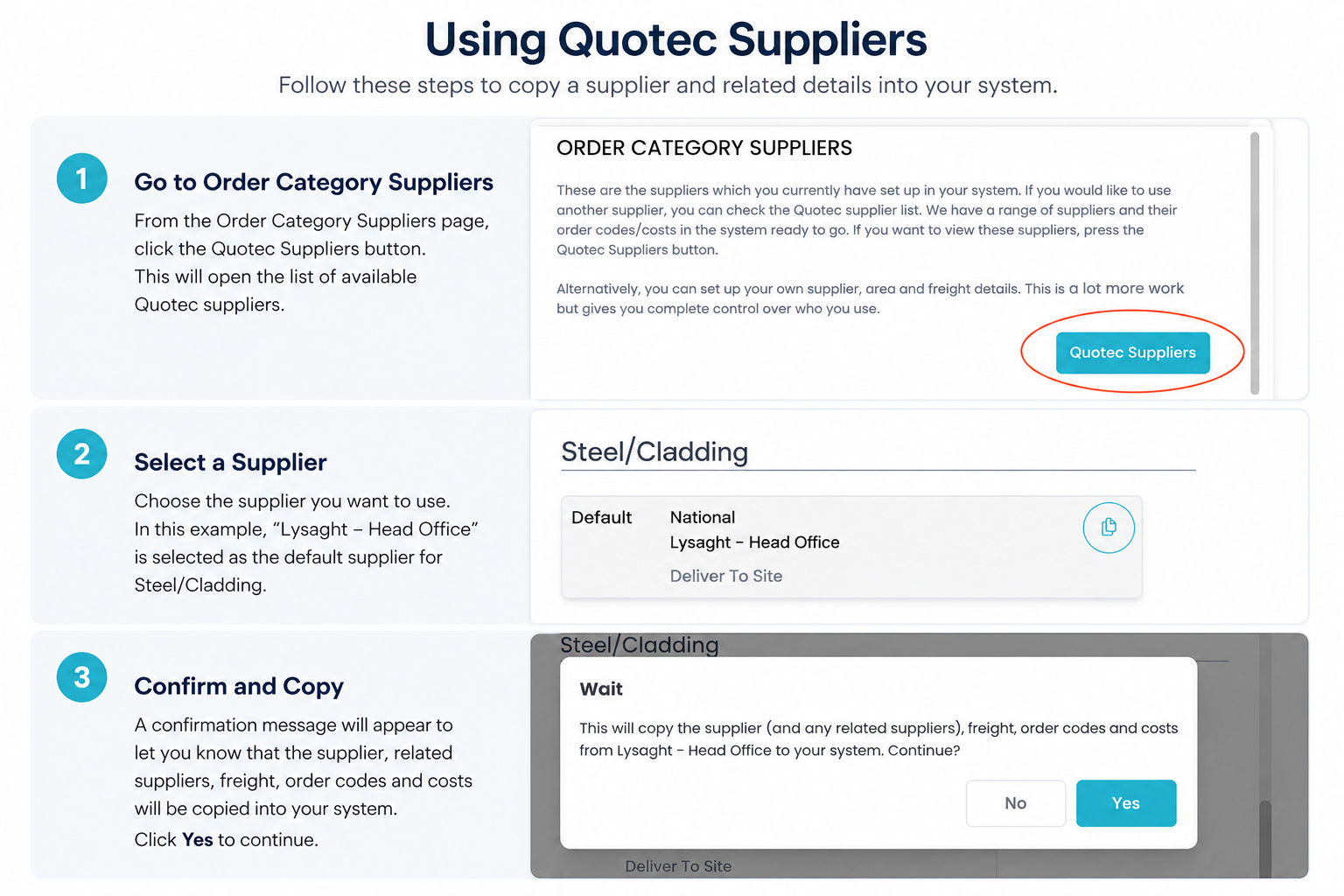
Copying Quotec Network Suppliers
To copy a Network Supplier into your organisation
-
Open Order Category Supplier (OCS) page.
-
Select Quotec Suppliers.
-
Select the supplier(s) you wish to add.
-
Click Copy.
The supplier records will now be available within your organisation.
Tip: Only copy suppliers you intend to use. Additional suppliers can be copied into your organisation at any time.
Updating Network Suppliers
Supplier pricing and configuration updates are distributed through the Quotec Cost Batch.
To deploy an update:
-
Navigate to Items → Ordering/Pricing → Cost Updates
-
Locate the relevant supplier price file.
-
Deploy the latest Cost Batch.
Some suppliers may also include updated Supplier Configuration Rules. Where this occurs, refer to the supplier's individual setup guide before deploying the update.
Can I Customise a Network Supplier?
Yes.
Once a Quotec Network Supplier has been copied into your organisation, you may customise it to suit your business.
Examples include:
-
Supplier account numbers.
-
Purchase order email addresses.
-
Some internal references.
-
Other organisation-specific settings.
However, be aware that some Supplier Configuration updates may replace or change Quotec-managed settings.
Also, there are some details on a Supplier record that are managed by Quotec and cannot be changed. If there is a field that on a Supplier record that does not meet your requirements, please contact our Support Team for assistance on how to customise a new record.
Finally, if you already have heavily customised a Network Supplier list and are unsure how an update will affect your configuration, contact the Quotec Support Team before deploying the latest Cost Batch.
Supplier-Specific Configuration
Some Network Suppliers require additional configuration after they have been copied into your organisation.
For setup instructions, refer to the relevant supplier guide:
Pricing Responsibility
Quotec provides supplier pricing files, supplier configurations and pricing architecture to assist members in preparing quotations and purchase orders.
While every effort is made to ensure supplier pricing and configuration data is accurate and up to date, pricing is subject to change without notice and may be affected by supplier updates, freight changes, product availability or other factors outside Quotec's control.
It is the responsibility of each Quotec member to:
-
Deploy the latest available supplier price files.
-
Ensure supplier pricing is current and appropriate for their business.
-
Review freight, supplier charges and any applicable surcharges.
-
Verify that quotations and purchase orders are accurate before they are issued to customers or suppliers.
Quotec acts as a software and data platform only and does not warrant the accuracy, completeness or ongoing validity of supplier pricing or freight information.
The member is solely responsible for the final review and approval of all pricing, quotations, Bills of Materials (BOMs), purchase orders and associated documentation generated using the Quotec platform.
Need Assistance?
Our Support Team is ready to help you get the most out of Quotec.
Whether you're configuring suppliers, troubleshooting an issue, or simply have a question about how something works, we're only a phone call or email away.
Quotec Support Team
📧 support@quotec.com.au
📞 (02) 5302 8357
🌐 http://www.quotec.com.au
Tip: Including your organisation name, job number (where applicable), screenshots and a brief description of the issue will help us resolve your enquiry faster.