
See below a complete walk through of the Quotec Menu. Click on the link to find more information about a section.

The Quotec menu is split into six main sections to make finding what you need easy.
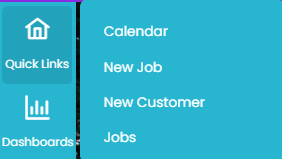
Quick Links
|
View the tasks to be completed each day by individual users and an overview of tasks over upcoming month. Also found under My Work |
|
|
Start designing a new job |
|
|
Add a new customer to your database with all their relevant information |
|
|
Search through all existing jobs: new, quoted, purchased and declined. Search using job #, customer name/ number, job status or created date. Also found under My Work |
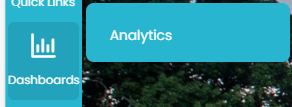
Dashboards
|
View KPIs for your company, users and branches |
Items
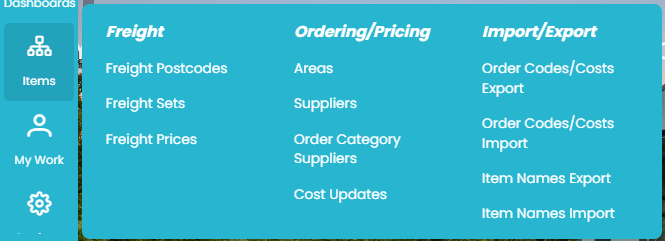
The items section is split further into Freight, Ordering/ Pricing, and Import/ Export.
|
Individually allocate and edit postcodes to courier zones |
|
|
View and create freight sets for your suppliers |
|
|
Assign prices to your existing freight sets |
|
|
Areas |
Add and edit existing areas to allow localised pricing |
|
Add suppliers and edit existing information including contact and ordering preferences |
|
|
Assign the suppliers you would like to use and edit consolidation preferences |
|
|
|
View and deploy price updates for Quotec’s supplier network |
|
|
Export files with all codes and pricing in the system for a supplier to use to make changes |
|
|
Prepare for future price rises and apply edits to codes and prices |
|
Create a data file with all item names to use to make changes |
|
|
Import your edited file to apply adjusted names in the system |
My Work
|
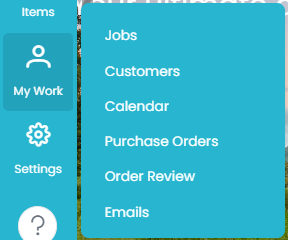
Search through all existing jobs: new, quoted, purchased and declined. Search using job #, customer name/ number, job status or created date. Also found under Quick Links |
|
|
Find, create or edit details for any of your customers (past or present) |
|
|
View tasks to be completed each day by individual users and an overview of tasks for upcoming months. Also found under Quick Links |
|
|
Search through all existing purchase orders to find information for a specific order |
|
|
Check which orders are behind schedule |
|
|
View the emails you have sent from Quotec and their status |
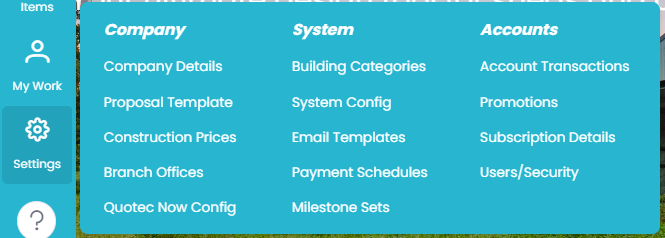
Settings
|
View and edit your company information as well as pricing details. |
|
|
View and edit proposal template information. |
|
|
View and edit your company’s construction prices for accurate quotes |
|
|
Branch Offices |
View, add and edit your company’s branches |
|
View and edit online designer template, customise how your Quotec Now will appear and the design of proposals sent from it. |
|
|
Customise each building category including the default margin |
|
|
Edit the system designer defaults - including footing bracket preference |
|
|
Edit the recipients and content of emails sent from Quotec |
|
|
View, edit and create new milestone sets to reflect your company’s processes |
|
|
View your payment history with Quotec |
|
|
Promotion |
View any promotion has given to your organization. |
|
View and edit your current subscription plan, card on file for Quotec payments and setup payid. |
|
|
Search active and inactive users, edit their contact details and the roles they can perform within Quotec, and deactivate users |