The purchase order search will allow you to search through all existing purchase orders in your system. This will include new, ordered and received purchase orders.
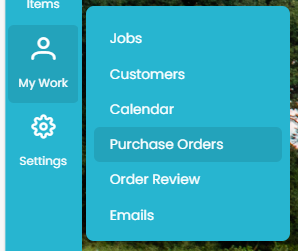
To find a purchase order go to MY WORK >> Purchase Orders
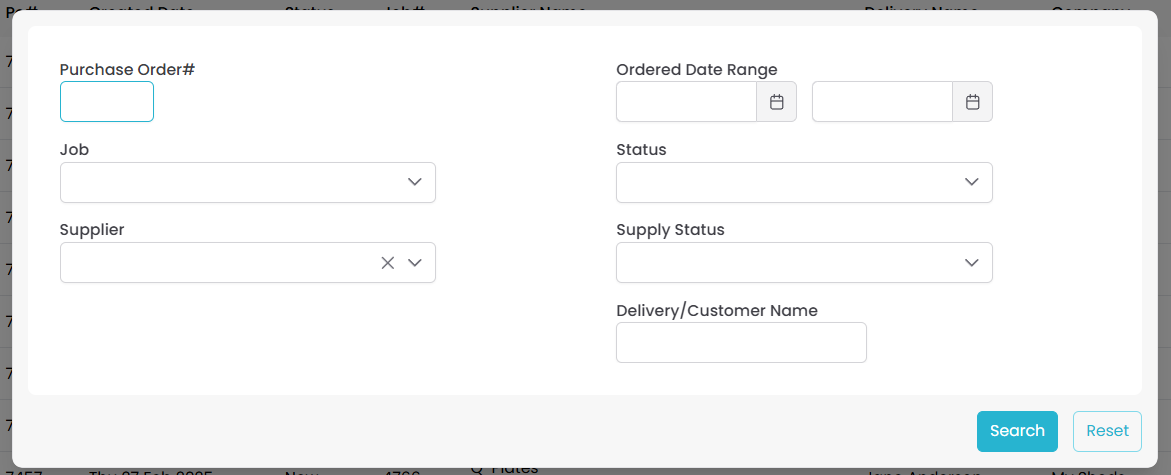
This screen will allow you to search through all existing orders using a number of criteria inside Filter.
What does each search criteria show?
|
Search Criteria
|
Search Results
|
|
Purchase Order #
|
The single purchase order with this unique purchase order number
|
|
Job
|
All purchase orders relating to this job
|
|
Supplier
|
All purchase orders for a particular reseller (e.g. CDA)
|
|
Created Date Range
|
All purchase orders created between this date range
|
|
Status
|
Filter for New, Sent or Received orders
|
|
Supply Status
|
Filters orders by it’s production status
Need Order Confirmation, Need Delivery Confirmation, or Need Dispatch
|
|
Delivery/Customer Name
|
All orders where the delivery name or customer name matches. This can also be used for partial name searches if you only know the customer’s first name.
|
Once you have filled in the criteria click SEARCH to view the results or RESET to view all orders.
The results will appear in the below format:
Click on the blue icon to the right to open a purchase order in a new tab.