
Quotec Network Suppliers – Cost Updates
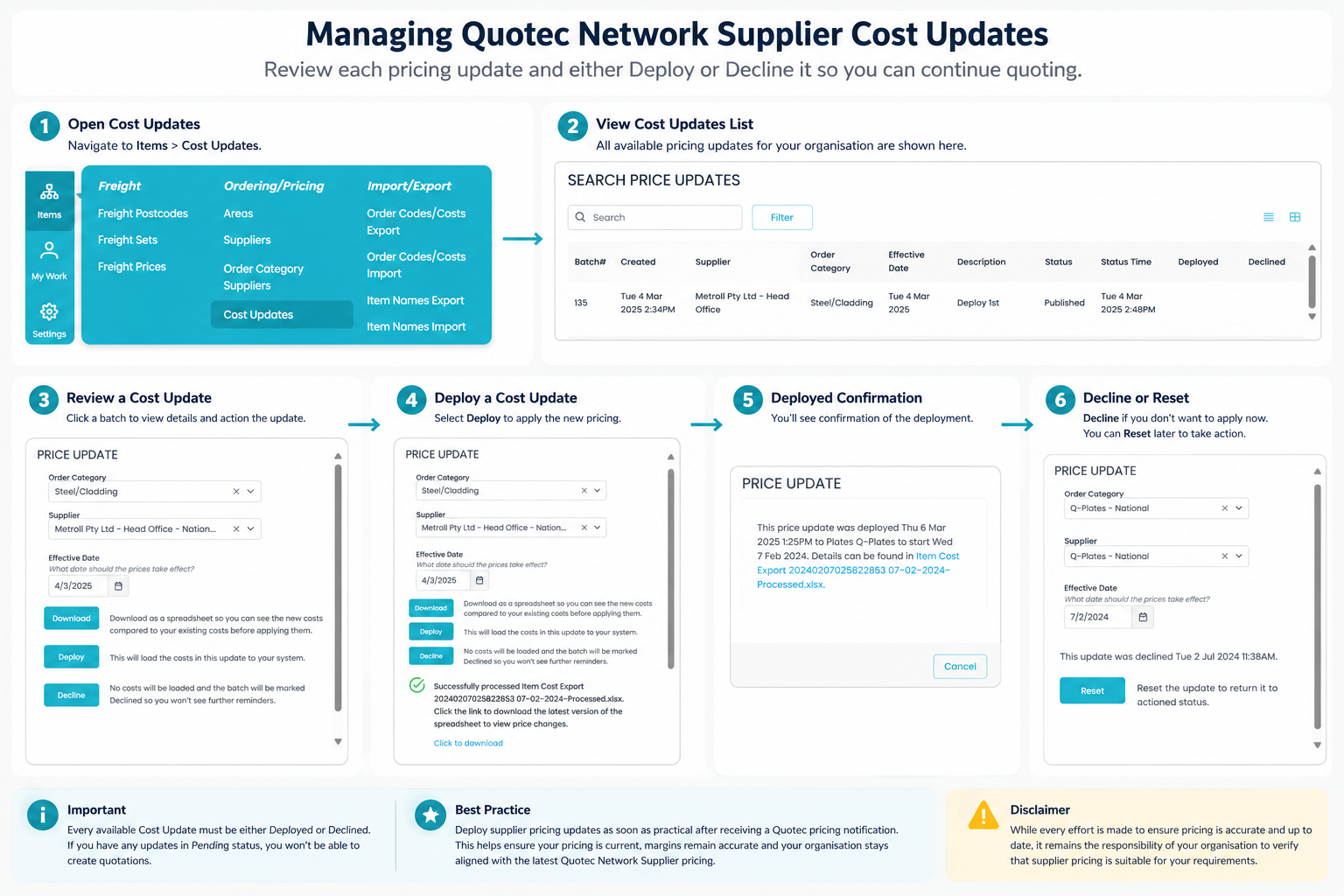
Quotec Network Suppliers allow Quotec to centrally maintain supplier pricing for supported national suppliers such as Lysaght, Metroll and other network suppliers.
Whenever Quotec publishes updated supplier pricing, a new Cost Update becomes available for your organisation. Before you can continue quoting, each update must be reviewed and either Deployed or Declined.
This process ensures your organisation is always quoting from a known supplier price list.
Note
Cost Updates are only provided for Quotec Network Suppliers that have been copied into your organisation. If you have not configured Quotec Network Suppliers yet, refer to the Use Quotec Network Suppliers help guide.
Accessing Cost Updates
Navigate to:
Items → Cost Updates
This page displays every supplier pricing update that is available for your organisation.
Understanding the Cost Updates List
Each pricing update contains important information to help you decide whether to deploy the new prices.
|
Column |
Description |
|---|---|
|
Supplier |
The Quotec Network Supplier receiving the update. |
|
Order Category |
The product category affected by the update. |
|
Effective Date |
The date the new supplier pricing becomes active. |
|
Description |
Details of the pricing batch. |
|
Status |
Indicates whether the update is Pending, Deployed or Declined. |
|
Deployed |
Date and time the pricing was deployed. |
|
Declined |
Date and time the pricing was declined. |
Reviewing a Cost Update
Click any Cost Update to open the pricing summary.
The summary displays:
-
Supplier
-
Order Category
-
Effective Date
-
Current Status
From this window you can:
-
Download the comparison report
-
Deploy the pricing
-
Decline the pricing update
Download the Pricing Comparison
Selecting Download generates a comparison spreadsheet showing:
-
Previous supplier cost
-
New supplier cost
-
Percentage increase or decrease
-
Previous pricing update date
This report allows you to review supplier pricing changes before applying them.
Downloading the report does not update your pricing.
Deploy a Cost Update
When you are ready to begin using the new supplier pricing, select Deploy.
Quotec will:
-
Import the new supplier pricing into your organisation
-
Record the deployment date and time
-
Mark the update as completed
Once deployed, reopening the Cost Update will continue to provide access to the pricing comparison report.
Decline a Cost Update
If you do not currently use that supplier, or are not yet ready to adopt the pricing update, select Decline.
Declining:
-
Leaves your existing pricing unchanged
-
Records the declined date and time
-
Allows you to continue quoting
You can return later and change your decision.
Reset a Declined Update
If a Cost Update has previously been declined, opening the update will display a Reset option.
Selecting Reset returns the update to Pending, allowing you to either:
-
Deploy the pricing, or
-
Decline it again.
Important
To ensure pricing consistency across the Quotec platform:
-
Every available Cost Update must be Deployed or Declined.
-
Organisations with outstanding (Pending) Cost Updates will be unable to create quotations until all updates have been actioned.
Best Practice
We recommend deploying supplier pricing updates as soon as practical after receiving a Quotec pricing notification.
This helps ensure:
-
Current supplier pricing is used for all quotations.
-
Material cost increases are reflected immediately.
-
Quoted margins remain accurate.
-
Your organisation remains aligned with the latest Quotec Network Supplier pricing.
Disclaimer: While every effort is made to ensure supplier pricing is accurate and up to date, it remains the responsibility of your organisation to verify that supplier pricing is suitable for your quoting requirements before issuing quotations or purchase orders.
🤝 Need Assistance?
Our Support Team is ready to help you get the most out of Quotec.
Whether you're configuring suppliers, troubleshooting an issue, or simply have a question about how something works, we're only a phone call or email away.
Quotec Support Team
📧 support@quotec.com.au
📞 (02) 5302 8357
🌐 http://www.quotec.com.au
Tip: Including your organisation name, job number (where applicable), screenshots and a brief description of the issue will help us resolve your enquiry faster.